

Building Mini Apps with Dynamic
Mini apps are lightweight, purpose-built web applications that can be embedded within social platforms, and they’re becoming increasingly popular. With the rise of Farcaster mini apps, developers can now create seamless wallet-connected experiences directly within these social platforms. Dynamic provides a powerful toolkit for integrating wallet functionality into your mini apps, allowing users to connect wallets, sign messages, and execute transactions without leaving the ecosystem. In this guide, we’ll walk through building a mini app using Dynamic’s wallet infrastructure integrated with Farcaster mini apps to create a seamless wallet experience that works across multiple blockchain networks. If you want to take a quick look at the final code, check out the GitHub repository.This guide demonstrates how to build a mini app that supports both Ethereum
and Solana wallets using Dynamic’s multi-chain support.
Project Structure
Here’s the file structure we’ll be building:Overview
Our mini app will allow users to:- Connect wallets via the Dynamic widget
- Support both Ethereum and Solana networks
- View wallet addresses and details
- Sign messages with their connected wallets
- Send transactions to other addresses
- Dynamic SDK: For wallet connection and management
- Farcaster Mini App SDK: For mini app integration and detection
- Wagmi: For Ethereum blockchain interactions
- Viem: For transaction formatting and handling
- Solana Web3.js: For Solana blockchain interactions
Setup
1. Create a new project
Follow the React Quickstart and use the Custom setup path: enable Ethereum (EVM) and Solana (SVM), with Wagmi and viem for EVM. Scaffold your app (this guide uses a Vite + React layout like the quickstart, or you can mirror the GitHub repository linked above).Dashboard: Under Chains & Networks, enable Ethereum and Solana. Under Sign-in Methods and Wallets, enable what your flow needs (including Embedded wallets if you use them). Under Security → Allowed Origins, add the origin where the app runs (for example
http://localhost:5173 for Vite).2. Install Dependencies
Navigate to your project directory and install the additional Farcaster dependencies:3. Configure Environment Variables
Create a.env file in the root of your project with your Dynamic environment ID:
You can find your Environment ID in the Dynamic dashboard under Developer
Settings > SDK & API Keys.
4. Set Up Farcaster Mini App Configuration
First, create a directory structure for the Farcaster mini app configuration:farcaster.json file in the .well-known directory:
Replace
https://your-domain.com with your actual domain or hosting URL.
The iconUrl, splashImageUrl, and ogImageUrl should point to images hosted on your server.
Update the other fields as necessary to match your app’s branding and functionality.5. Set Up Wagmi Configuration
Create awagmi.ts file in your src directory:
src/wagmi.ts
chains array and enabling them in your Dynamic dashboard.
6. Update HTML with Mini App Meta Tag
Add the Farcaster mini app meta tag to yourindex.html file:
index.html
Implementation
Main App Component
Let’s start by setting up the mainApp.tsx component that will integrate Dynamic with our mini app:
src/App.tsx
- Configuring the Dynamic context provider with support for both Ethereum and Solana wallet connectors
- Integrating Wagmi and React Query providers needed for blockchain interactions
- Setting up the Farcaster mini app integration with the
sdk.actions.ready()call - Creating a simple connect menu that shows the wallet address when connected
- Handling the UI state based on the authentication status
Adding Styles
For styling your mini app, you can either check out the file on the GitHub repository or create your own styles according to your design preferences.Building Wallet Functionality
Now, let’s create a component that will handle wallet interactions. First, create aMethods.tsx file in the components folder:
src/components/Methods.tsx
DynamicMethods component handles the core wallet functionality for our mini app. It leverages several hooks from Dynamic’s SDK to access wallet and user information, and provides a simple interface for users to interact with their wallets.
Key Functions:
- showUser: Displays the current user’s information from the
useDynamicContexthook, including their ID, auth method, and other profile details - showUserWallets: Shows all connected wallets using the
useUserWalletshook, providing details about addresses, networks, and wallet types - clearResult: Resets the display after viewing data
- fetchEthereumPublicClient, fetchEthereumWalletClient, signEthereumMessage: Ethereum-specific functions to fetch public/wallet clients and sign messages
- fetchSolanaConnection, fetchSolanaSigner, signSolanaMessage: Solana-specific functions to fetch connection/signer and sign messages
- handleEthereumTransaction, handleSolanaTransaction: Functions to handle sending transactions on Ethereum and Solana, respectively
Methods.css or if you want to use the same styles check out this file on Github.
App.tsx
DynamicMethods component within your main App component, placing it after the ConnectMenu component to create a logical user flow: first connect a wallet, then interact with wallet methods.
For CSS styling, check out the file in the GitHub repository, or feel free to create your own styles as needed.
Running the Mini App
You can now run your mini app locally:http://localhost:5173 by default.
To try out the app for testing, you’ll need to expose your local server to the internet. You can use services like cloudflared or ngrok:
vite.config.ts file:
vite.config.ts
your-tunnel-domain.trycloudflare.com with your actual tunnel domain. The allowedHosts setting enables requests from specified domains to your development server, which is essential for testing with tunneling tools.
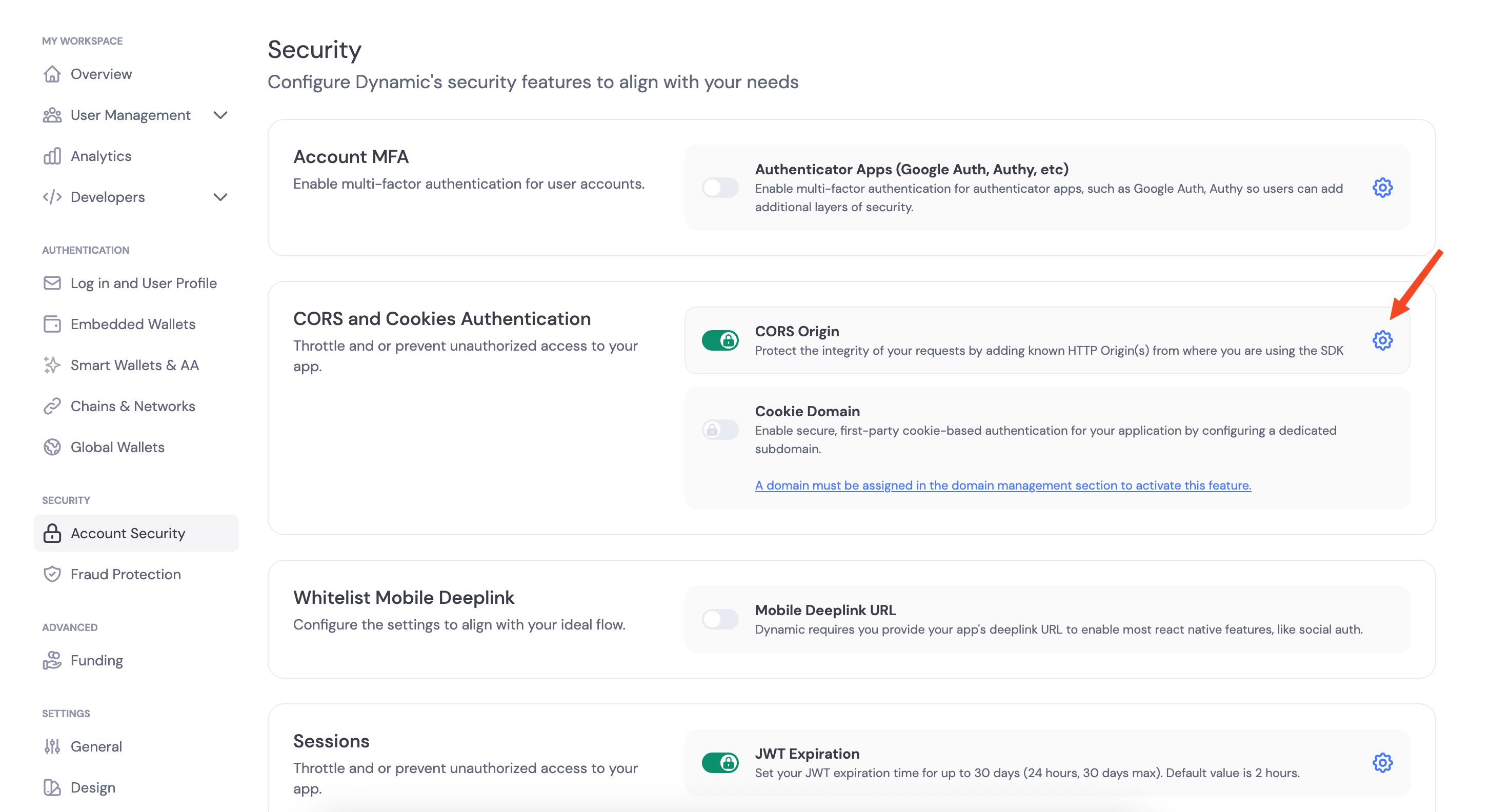
Once your app is running, copy the public URL provided by cloudflared or ngrok and add it in CORS Origins in your Dynamic dashboard under Developer Settings > CORS Origins. This step is crucial as it allows your mini app to communicate with the Dynamic backend.
Testing the Mini App
To test your mini app in the Farcaster ecosystem, you can use the mini app embed tool. This tool allows you to preview how your mini app would appear and function within Farcaster’s interface.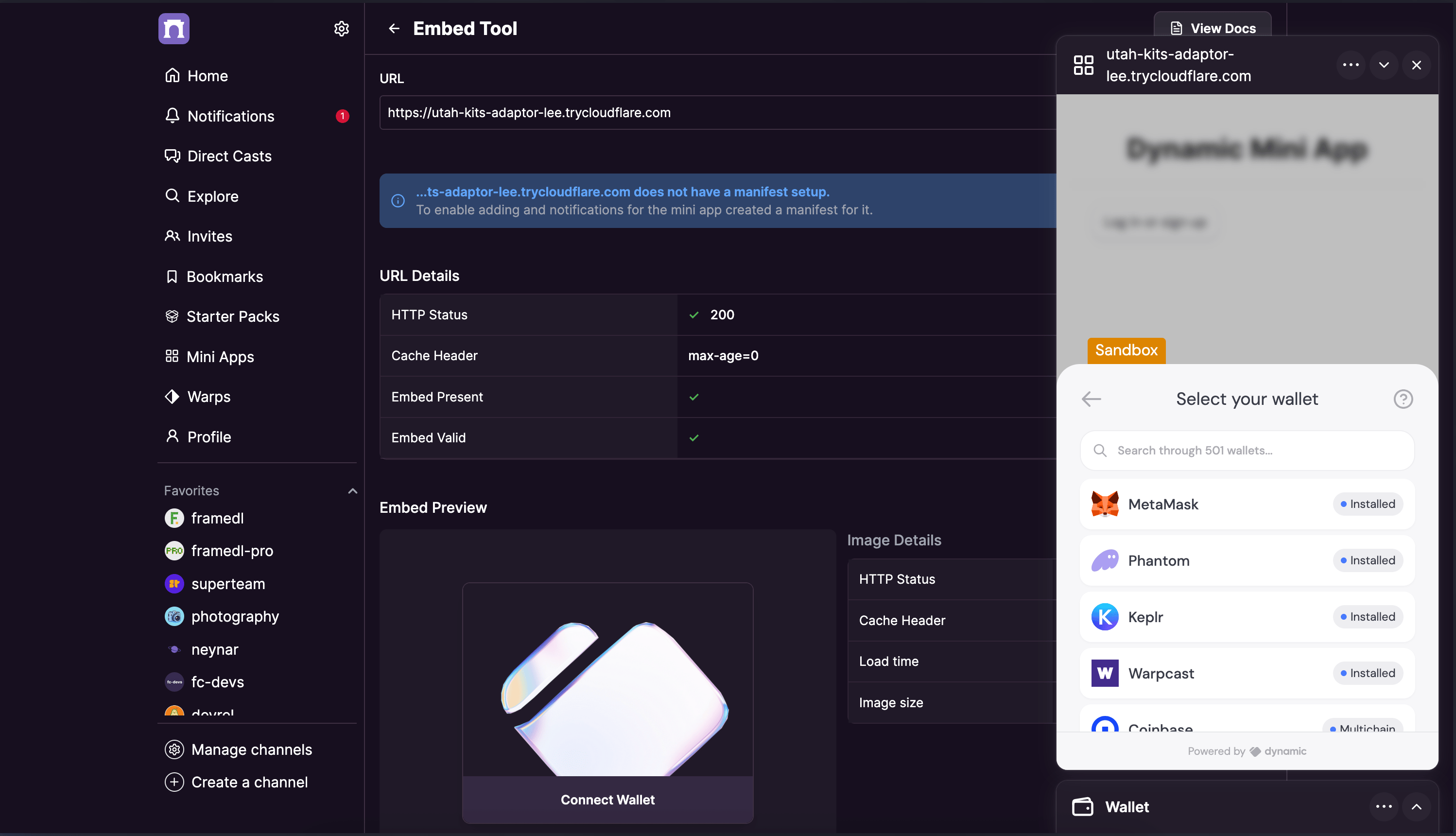
Conclusion
You’ve now built a complete mini app with Dynamic that works seamlessly with Farcaster! This application enables users to connect different types of wallets, sign messages, and send transactions all within a unified interface. By leveraging Dynamic’s multi-chain support, your mini app works with both Ethereum and Solana wallets without requiring additional configuration. This flexibility allows your users to interact with their preferred wallets and networks, creating a more inclusive experience. The mini app you’ve built demonstrates several key capabilities:- Wallet connection with Dynamic’s embedded widget
- User identification and wallet information retrieval
- Chain-specific functionality for both Ethereum and Solana
- Message signing for authentication purposes
- Transaction sending with appropriate validation
- Check out the complete GitHub repository for this project
- Join our Discord community
- Check out Dynamic’s documentation
- Follow us on X