

Before you start: Node.js 18+, and a Dynamic environment ID and API token from the Dynamic Developer Console.
- Agent-friendly
- Manual
Add the Dynamic docs MCP to your AI editor first — your agent can then query the docs directly.
- Cursor
- Claude Code
- Codex
- Other
claude mcp add --transport http dynamic https://www.dynamic.xyz/docs/mcp
codex mcp add dynamic --url https://www.dynamic.xyz/docs/mcp
If your editor or agent supports remote HTTP MCP, add a server that points at
https://www.dynamic.xyz/docs/mcp. The exact steps depend on the product; use its MCP documentation for URL-based or HTTP transport setup.# Node SDK Quickstart
## Purpose and Usage
This document provides structured quickstart information for the Dynamic Node SDK. It is designed to be consumed by LLMs to generate accurate installation commands and code examples based on user requirements.
> **Important scope note:** The Dynamic Node SDK is for **server-side wallet operations only** — creating wallets, signing transactions, and MPC key management. If the user needs to verify Dynamic-issued JWTs on their backend, direct them to: https://www.dynamic.xyz/docs/overview/authentication/tokens — that is a separate concern and does not use these packages.
---
## How to use this document
Start by asking the user which path they want:
> "Would you like a **Quick start** (EVM + pnpm + TWO_OF_TWO threshold scheme, zero configuration — recommended if you're just getting started) or a **Custom setup** (choose your chains, package manager, and threshold scheme)?"
- If the user chooses **Quick start**: follow the Quick Start Path section exactly. Do not ask any configuration questions — execute the happy path as written.
- If the user chooses **Custom setup**: follow the Custom Setup Path section and ask all configuration questions before proceeding.
---
## Quick Start Path
> Use this path when the user chooses Quick start. Execute every step in order. Do not skip steps. Do not ask configuration questions.
**Stack:** pnpm + EVM only + TWO_OF_TWO threshold scheme
### Step 1 — Prerequisites
Tell the user:
- Node.js 18+ is required
- A Dynamic environment ID and API token are required — get them at https://console.dynamic.xyz/dashboard/developer/api
Ask the user for their environment ID and API token before proceeding.
### Step 2 — Install
Initialize a new project and install all required packages explicitly. `@dynamic-labs-wallet/core` is required for `ThresholdSignatureScheme`. `viem` is a required peer dependency of `@dynamic-labs-wallet/node-evm`, so no package manager installs it for you. `tsx` is the TypeScript runtime used to execute the app.
```bash
pnpm init
```
Then open the generated `package.json` and add `"type": "module"` — this is required because the SDK code uses ES module syntax (top-level `await`):
```json
{
"type": "module",
"pnpm": { "onlyBuiltDependencies": ["esbuild"] }
}
```
> **Why `onlyBuiltDependencies`:** pnpm v10 suppresses build scripts by default, which prevents esbuild from installing its platform binary. Adding this before your first install avoids a tsx crash on first run.
Then install:
```bash
pnpm add @dynamic-labs-wallet/node-evm @dynamic-labs-wallet/core viem
pnpm add -D tsx
```
### Step 3 — Set up environment variables
Create a `.env` file at the project root:
```bash
# .env
DYNAMIC_AUTH_TOKEN=your_api_token_here
DYNAMIC_ENVIRONMENT_ID=your_environment_id_here
WALLET_PASSWORD=your_secure_wallet_password_here
```
> `DYNAMIC_AUTH_TOKEN` is a **server-level API credential** from the Dynamic dashboard — not a user-facing JWT. Never expose it to clients.
To load these variables at runtime, use Node's built-in `--env-file` flag (Node 20.6+):
```bash
npx tsx --env-file=.env server.ts
```
For older Node versions, install and import `dotenv` at the top of your entry file:
```bash
pnpm add dotenv
```
```typescript
import 'dotenv/config';
```
### Step 4 — Initialize the client
> **`enableMPCAccelerator` note:** This option enables AWS Nitro Enclave-based attestation for faster MPC operations. Set it to `true` only in environments that support Nitro Enclave attestation (e.g. production AWS infrastructure). In local development or CI environments, set it to `false` — using `true` in unsupported environments will cause a `SessionAttestationError: Attestation verification failed` crash during wallet creation.
```typescript
import { DynamicEvmWalletClient } from '@dynamic-labs-wallet/node-evm';
export const authenticatedEvmClient = async ({
authToken,
environmentId,
}: {
authToken: string;
environmentId: string;
}) => {
const client = new DynamicEvmWalletClient({
environmentId,
enableMPCAccelerator: false, // Set to true only on AWS Nitro Enclave-compatible infrastructure
});
await client.authenticateApiToken(authToken);
return client;
};
```
### Step 5 — Create a wallet
```typescript
import { ThresholdSignatureScheme } from '@dynamic-labs-wallet/core';
const evmClient = await authenticatedEvmClient({
authToken: process.env.DYNAMIC_AUTH_TOKEN!,
environmentId: process.env.DYNAMIC_ENVIRONMENT_ID!,
});
const { walletMetadata, externalServerKeyShares } = await evmClient.createWalletAccount({
thresholdSignatureScheme: ThresholdSignatureScheme.TWO_OF_TWO,
password: process.env.WALLET_PASSWORD,
onError: (error: Error) => {
console.error('Wallet creation error:', error);
},
backUpToDynamic: true,
});
console.log('Wallet created:', walletMetadata.accountAddress);
```
### Step 6 — Sign a message
```typescript
const signature = await evmClient.signMessage({
walletMetadata,
externalServerKeyShares,
message: 'Hello from Dynamic!',
password: process.env.WALLET_PASSWORD,
});
console.log('Message signed:', signature);
```
> **Next:** To sign and broadcast a real transaction, see [Sign EVM Transactions](/node/evm/sign-transactions).
### Step 7 — Run the app
```bash
npx tsx --env-file=.env server.ts
```
---
## Custom Setup Path
> Use this path when the user chooses Custom setup. Ask ALL questions below before generating any code.
**Questions to ask the user:**
1. Which package manager do you prefer? (npm, yarn, pnpm, bun)
2. Which chains do you want to support? (EVM, SVM, TON, Bitcoin — one or more)
3. Which threshold signature scheme? (TWO_OF_TWO or TWO_OF_THREE)
**Only after receiving answers**, use the sections below to generate the correct setup.
### Package Manager Commands
- `npm`: `npm i`
- `yarn`: `yarn add`
- `pnpm`: `pnpm add`
- `bun`: `bun add`
### Package Mapping
Always install all of the following explicitly — do not rely on transitive dependencies, which break under pnpm's strict mode.
- Core (always required): `@dynamic-labs-wallet/core`
- EVM: `@dynamic-labs-wallet/node-evm` and `viem` (a required peer dependency of `node-evm`, so no package manager installs it for you)
- SVM: `@dynamic-labs-wallet/node-svm` and `@solana/web3.js`
- TON: `@dynamic-labs-wallet/node-ton`, `@ton/ton` and `@ton/crypto`
- Bitcoin: `@dynamic-labs-wallet/node-btc`
- TypeScript runtime (dev dependency): `tsx`
**Example — EVM + SVM with pnpm:**
```bash
pnpm add @dynamic-labs-wallet/node-evm @dynamic-labs-wallet/node-svm @dynamic-labs-wallet/core viem @solana/web3.js
pnpm add -D tsx
```
**Example — Bitcoin with pnpm:**
```bash
pnpm add @dynamic-labs-wallet/node-btc @dynamic-labs-wallet/core
pnpm add -D tsx
```
> **Why `onlyBuiltDependencies`:** pnpm v10 suppresses build scripts by default, which prevents esbuild from installing its platform binary. Adding this before your first install avoids a tsx crash on first run.
> ```json
> "pnpm": { "onlyBuiltDependencies": ["esbuild"] }
> ```
### Environment Variables
```bash
# .env
DYNAMIC_AUTH_TOKEN=your_api_token_here
DYNAMIC_ENVIRONMENT_ID=your_environment_id_here
WALLET_PASSWORD=your_secure_wallet_password_here
```
> `DYNAMIC_AUTH_TOKEN` is a **server-level API credential** — not a user JWT. Never expose it to clients.
Load at runtime with Node 20.6+:
```bash
npx tsx --env-file=.env server.ts
```
Or with `dotenv` for older Node versions:
```typescript
import 'dotenv/config';
```
### Client Initialization
Use the same parametric pattern for all chains — pass credentials as function arguments rather than reading directly from `process.env` inside the factory. This keeps clients testable and consistent.
> **`enableMPCAccelerator` note:** Set to `true` only on AWS Nitro Enclave-compatible infrastructure (e.g. production AWS). In local development or CI, set to `false` — `true` will cause a `SessionAttestationError` crash in unsupported environments.
**EVM:**
```typescript
import { DynamicEvmWalletClient } from '@dynamic-labs-wallet/node-evm';
export const authenticatedEvmClient = async ({
authToken,
environmentId,
}: {
authToken: string;
environmentId: string;
}) => {
const client = new DynamicEvmWalletClient({
environmentId,
enableMPCAccelerator: false, // Set to true only on AWS Nitro Enclave-compatible infrastructure
});
await client.authenticateApiToken(authToken);
return client;
};
```
**SVM:**
```typescript
import { DynamicSvmWalletClient } from '@dynamic-labs-wallet/node-svm';
export const authenticatedSvmClient = async ({
authToken,
environmentId,
}: {
authToken: string;
environmentId: string;
}) => {
const client = new DynamicSvmWalletClient({
environmentId,
});
await client.authenticateApiToken(authToken);
return client;
};
```
**TON:**
```typescript
import { DynamicTonWalletClient } from '@dynamic-labs-wallet/node-ton';
export const authenticatedTonClient = async ({
authToken,
environmentId,
}: {
authToken: string;
environmentId: string;
}) => {
const client = new DynamicTonWalletClient({
environmentId,
});
await client.authenticateApiToken(authToken);
return client;
};
```
**Bitcoin:**
```typescript
import { DynamicBtcWalletClient } from '@dynamic-labs-wallet/node-btc';
export const authenticatedBtcClient = async ({
authToken,
environmentId,
}: {
authToken: string;
environmentId: string;
}) => {
const client = new DynamicBtcWalletClient({
environmentId,
});
await client.authenticateApiToken(authToken);
return client;
};
```
### Wallet Creation (all chains)
> **Bitcoin-specific:** Bitcoin wallet creation requires a `bitcoinConfig` with `addressType`. Import `BitcoinAddressType` from `@dynamic-labs-wallet/core`.
> ```typescript
> import { BitcoinAddressType } from '@dynamic-labs-wallet/core';
>
> const { walletMetadata, externalServerKeyShares } = await btcClient.createWalletAccount({
> thresholdSignatureScheme: ThresholdSignatureScheme.TWO_OF_TWO,
> password: process.env.WALLET_PASSWORD,
> backUpToDynamic: true,
> bitcoinConfig: {
> addressType: BitcoinAddressType.NATIVE_SEGWIT,
> },
> });
> ```
```typescript
import { ThresholdSignatureScheme } from '@dynamic-labs-wallet/core';
const { walletMetadata, externalServerKeyShares } = await client.createWalletAccount({
thresholdSignatureScheme: ThresholdSignatureScheme.TWO_OF_TWO, // or TWO_OF_THREE
password: process.env.WALLET_PASSWORD,
onError: (error: Error) => {
console.error('Wallet creation error:', error);
},
backUpToDynamic: true,
});
console.log('Wallet created:', walletMetadata.accountAddress);
```
### SVM Transaction Example
```typescript
import {
Connection,
LAMPORTS_PER_SOL,
PublicKey,
SystemProgram,
Transaction,
} from '@solana/web3.js';
import { addSignatureToTransaction, decodeBase58 } from '@dynamic-labs-wallet/node-svm';
const svmClient = await authenticatedSvmClient({
authToken: process.env.DYNAMIC_AUTH_TOKEN!,
environmentId: process.env.DYNAMIC_ENVIRONMENT_ID!,
});
const { walletMetadata, externalServerKeyShares } = await svmClient.createWalletAccount({
thresholdSignatureScheme: ThresholdSignatureScheme.TWO_OF_TWO,
password: process.env.WALLET_PASSWORD,
onError: (error: Error) => console.error('SVM wallet creation error:', error),
backUpToDynamic: true,
});
const connection = new Connection('https://api.devnet.solana.com', 'confirmed');
const senderPublicKey = new PublicKey(walletMetadata.accountAddress);
const recipientPublicKey = new PublicKey('recipient_address_here');
const transaction = new Transaction().add(
SystemProgram.transfer({
fromPubkey: senderPublicKey,
toPubkey: recipientPublicKey,
lamports: 0.01 * LAMPORTS_PER_SOL,
})
);
const { blockhash } = await connection.getLatestBlockhash();
transaction.recentBlockhash = blockhash;
transaction.feePayer = senderPublicKey;
// signTransaction returns a base58 signature — decode and attach before broadcasting
const signatureBase58 = await svmClient.signTransaction({
walletMetadata,
externalServerKeyShares,
transaction,
password: process.env.WALLET_PASSWORD,
});
const signedTx = addSignatureToTransaction({
transaction,
signature: decodeBase58(signatureBase58),
signerPublicKey: senderPublicKey,
});
const signature = await connection.sendRawTransaction(signedTx.serialize());
await connection.confirmTransaction(signature);
console.log('Transaction confirmed:', signature);
```
### Valid Chain Combinations
- Any single chain or any combination of EVM, SVM, TON, and Bitcoin is valid
- At least one chain must be selected
### Documentation
All docs for this SDK: https://docs.dynamic.xyz (paths starting with `/node/`)
Environment ID and API token: https://console.dynamic.xyz/dashboard/developer/api
---
## Critical Reference
| Correct | Incorrect | Notes |
|---|---|---|
| Install `viem` explicitly with EVM | Rely on it as a transitive dep | Required peer dependency of `@dynamic-labs-wallet/node-evm`; never installed transitively |
| Install `@solana/web3.js` with SVM, `@ton/ton` + `@ton/crypto` with TON | Import them without installing | The chain examples import them directly; pnpm strict mode fails otherwise |
| Install `@dynamic-labs-wallet/core` explicitly | Rely on it as a transitive dep | Required for `ThresholdSignatureScheme`; breaks under pnpm strict mode without explicit install |
| `password: process.env.WALLET_PASSWORD` | `password: "your-secure-password"` | Never hardcode passwords in source |
| Pass credentials as function args | Read `process.env` inside factory | Consistent pattern across EVM, SVM, TON — easier to test |
| `DYNAMIC_AUTH_TOKEN` = server API credential | `DYNAMIC_AUTH_TOKEN` = user JWT | Completely different credentials. Never expose the API token to clients |
| `enableMPCAccelerator: false` in local/CI | `enableMPCAccelerator: true` in local/CI | `true` requires AWS Nitro Enclave support — causes `SessionAttestationError` in standard environments |
---
## Troubleshooting — Dashboard Configuration
If the SDK initializes but wallet creation fails or returns errors, verify the following in the Dynamic dashboard at https://console.dynamic.xyz:
### 1 — Embedded wallets not enabled
Go to **Wallets** and enable embedded wallets. Without this, `createWalletAccount()` will return an error.
### 2 — Chains not enabled
Go to **Chains & Networks** and enable the chains your app uses (Ethereum, Solana, TON, etc.). Wallet creation will fail silently or error if the chain isn't toggled on.
### 3 — API token has insufficient permissions
Go to **Developer → API Tokens** and confirm the token has the correct permission scopes for wallet operations. See https://www.dynamic.xyz/docs/overview/developer-dashboard/api-token-permissions for the full scope reference.
### 4 — `SessionAttestationError` during wallet creation
This error occurs when `enableMPCAccelerator: true` is set in an environment that does not support AWS Nitro Enclave attestation (e.g. local dev, CI, non-AWS servers). Set `enableMPCAccelerator: false` to resolve it.
If these are all configured and the issue persists, check server logs for error codes and refer to https://docs.dynamic.xyz/overview/troubleshooting/general.
Install the SDK
Get Your Credentials
Navigate to the Dynamic Developer Console and:- Copy your
Environment ID - Create a new API token
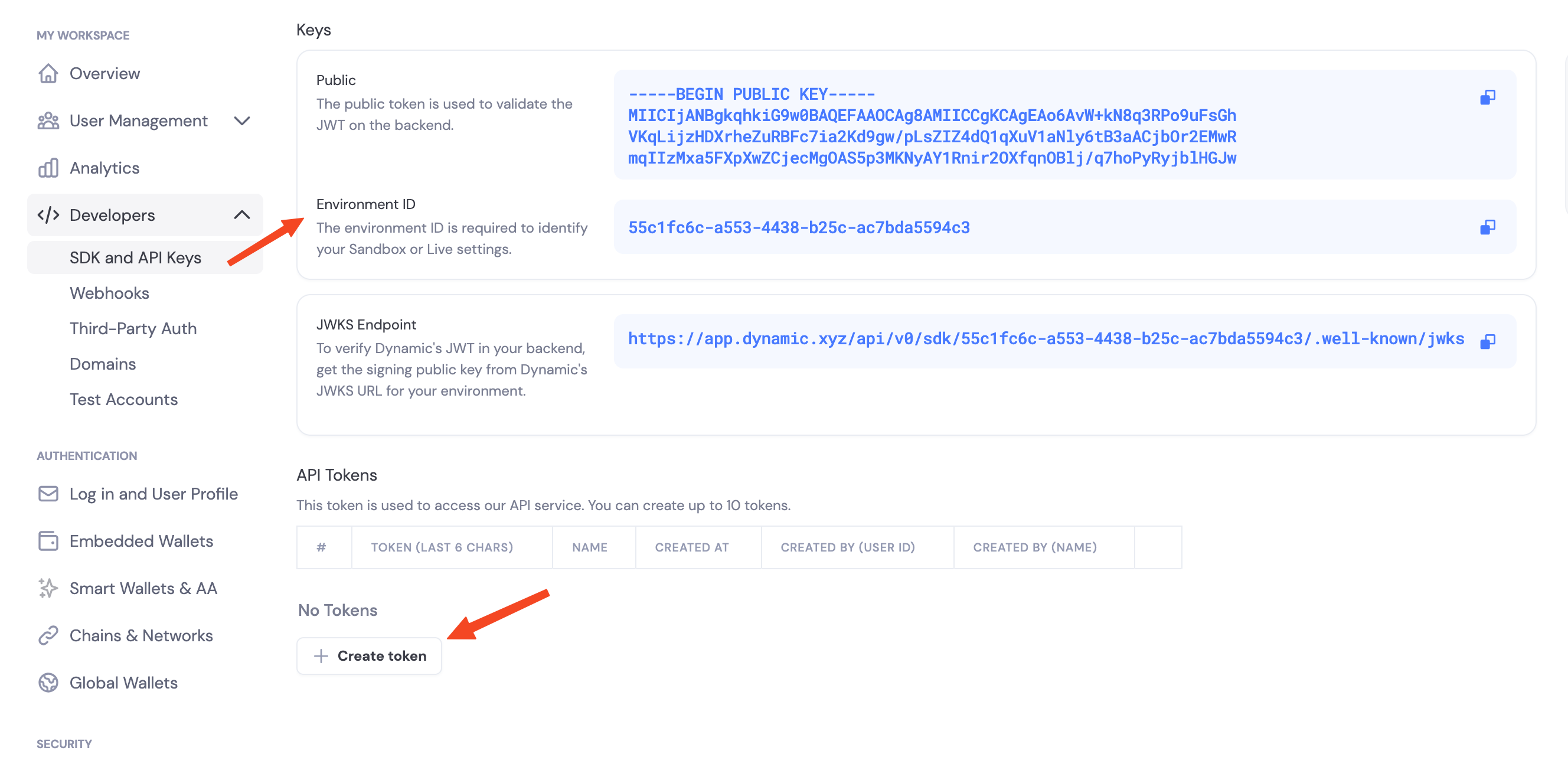
Example Usage
The quickstart embed under Install the SDK includes dependency install and server initialization. Use the environment ID and API token from Get Your Credentials in your code and environment variables below.Enable Features in Dashboard
Before you can use wallet features, you need to enable them in your Dynamic developer console:- Go to your Dynamic Developer Console
- Select your project
- Go to Wallets and enable embedded wallets
- Go to Chains and enable the networks you want to support (Ethereum, Solana, TON, etc.)
Environment Variables
# .env
DYNAMIC_AUTH_TOKEN=your_auth_token_here
DYNAMIC_ENVIRONMENT_ID=your_environment_id_here
WALLET_PASSWORD=your_secure_wallet_password_here
Available Threshold Signature Schemes
- TWO_OF_TWO: Requires both server and Dynamic’s infrastructure to sign
- TWO_OF_THREE: Requires 2 out of 3 shares to sign